
Invoices over a dollar amount need a second approver
Send small invoices down the normal path and large ones through a longer one — two approval processes, two Content Capture triggers with a field-value Range condition, two rules. No one has to look at the amount.
Before you begin
- The invoice document type has a numeric total field (a Currency or Number field)
- Two approval processes exist on the document type, one per path (see Set up an approval process)
When you're done, an invoice under your threshold starts the standard approval path, and one at or over it starts a second process that adds the extra approver — decided by the amount field the moment the invoice is filed.
- Trigger
- Content Capture › Content Captured in this Document TypeField Evaluation: Selected Field Value(s) · Field: Invoice Total · Field-Match Type: Range · From 5000 to 999999999
- Action
- Approval Process - Start ProcessApproval Process: "Large invoice approval" (the path with the second approver)
- Rule
- "Large invoice → two-step approval", enabled — plus a mirror rule for the small-invoice range
How the split works
Content Central doesn't have an "if amount > X, add a step" setting inside one process. What it has is a field condition on a trigger and the ability to start any process from a rule. So you build:
- Two approval processes: Standard invoice approval (say, AP clerk → AP manager) and Large invoice approval (AP clerk → AP manager → Controller).
- Two triggers on the invoice document type: one that matches the small range, one that matches the large range.
- Two rules, each starting the matching process.
Turn off the Automatically start this process on all captured content option on both processes. With it on, every invoice would enter that process regardless of the amount, and your rule would start a second copy.
Build the two triggers
Go to Administration > Catalogs & Document Types, pick the Catalog and the invoice Document Type, and click the Workflow tile. Click Triggers, then New Trigger.
Type:
Content CaptureandContent Captured in this Document Type. Trigger Name:Invoice captured — 5,000 and over.
Field Evaluation:
Selected Field Value(s). Field: your invoice total field.
Field-Match Type:
Range. Enter From and including:5000and to and including: a number larger than any invoice you'll ever see, such as999999999.
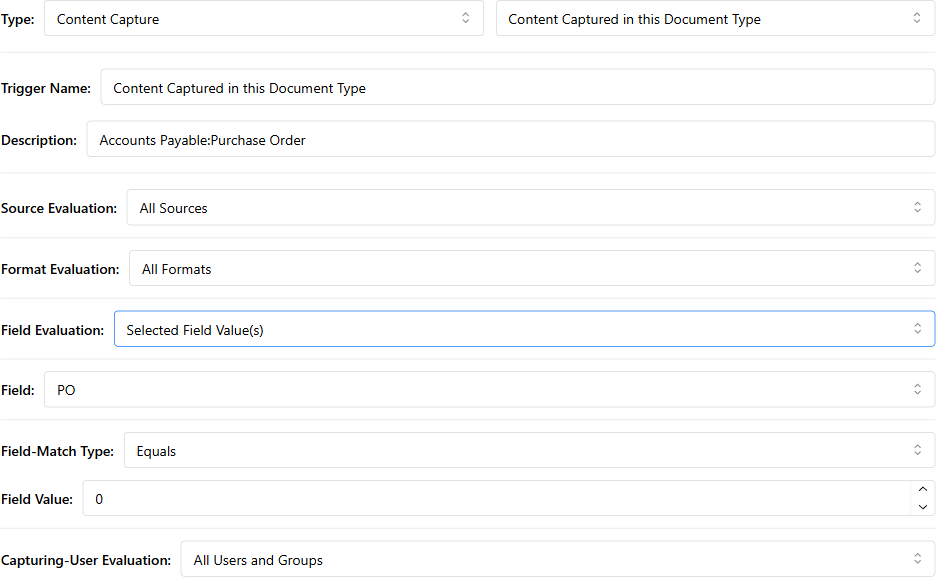
Click Save.
Click New Trigger again and build the mirror: Trigger Name:
Invoice captured — under 5,000, same type and field, Range from0to4999.99.
What you should see: two Live triggers in the list, each showing the field and range in its Details column.
The two ranges must not overlap and must not leave a gap, or an invoice at the boundary either starts both processes or neither. 0–4999.99 and 5000–999999999 is safe for a two-decimal currency field. Invoices with an empty total match neither range — see Variations for catching those.
Build the two actions
Click the Actions card, then New Action.
Type:
Approval Process - Start Process. Action Name:Start large invoice approval. Assignment Type:Single Approval Process. Approval Process:Large invoice approval. Save.
New Action again: Action Name:
Start standard invoice approval, Approval Process:Standard invoice approval. Save.
Wire the two rules
Click the Rules card, then New Rule. Rule Name:
Large invoice → two-step approval. Add Trigger:Invoice captured — 5,000 and over. Add Action:Start large invoice approval. Apply.
New Rule again:
Small invoice → standard approval, triggerInvoice captured — under 5,000, actionStart standard invoice approval. Apply.
Test it
Capture two invoices: one coded with a total of
4,999.00, one with5,000.00.
Check each approver's Queues > Approval tab, and each document's View History.
What you should see: the small one on the standard path's first approver, the large one on the large path's first approver, and each history showing Process started by workflow rule. with the process name. After the AP manager approves the large one, it moves on to the Controller instead of completing.
Variations
| Want this instead | Change this |
|---|---|
| Three tiers (under 1,000 · 1,000–9,999.99 · 10,000+) | Three triggers with three ranges, three processes, three rules |
| Catch invoices with no total entered | A third trigger: Field Evaluation: Selected Field Lacks Value, Field: your total field → route to a work queue or email AP to fix the coding (work-queue recipe) |
| Decide by vendor instead of amount | Field: your vendor field, Field-Match Type: Equals, and the vendor name as the value — one trigger per vendor you treat differently |
| Route on the invoice's date instead | Text and date fields offer different match types; date fields compare against today (reminder recipe) |
| Same split, but from the Coding Queue commit | Trigger type Coding-Queue Commit › Committed in this Document Type with the same field conditions |