
Find any invoice by a number printed on it
Type an invoice number into Search and pull up the invoice, whatever the vendor's layout and whatever the file is called. Content Central reads every scanned page as it's captured, so there are no fields to set up.
When you're done, anyone can type an invoice number into Search and pull up that invoice, whatever the vendor's layout and whatever the file is called. This finds invoices; it doesn't fill in fields for you.
Content Central reads the text of every scanned page as it's captured. About 10 seconds later, any word or number on the page can be searched, including the invoice number.
Check that invoices are read when they're captured
Two settings, usually already on:
The capture job reads scanned pages. Open the job that brings in your invoices in Catalog Manager, on the server (your system administrator may need to do this). On the Descriptor tab, find Processing Type (it shows only when Document Descriptor, the setting for how files become documents, is
None). It must beImage.Electronicstores files as they arrive, so scanned pages are never read. If you don't see Processing Type, there's nothing to change. See Set up a folder capture job.
Text reading is switched on. Under Administration > System Settings > Capture Settings, Enable OCR and auto-rotate must be checked. This is a system administrator setting (Control OCR and image preparation).
What you should see: capture one test invoice, wait about 10 seconds, then search for a word from the middle of the page, like an item description. The invoice comes up.
Find an invoice
Click the magnifier in the top bar, type the invoice number exactly as it's printed, and press Enter.
Click the result to open the invoice.
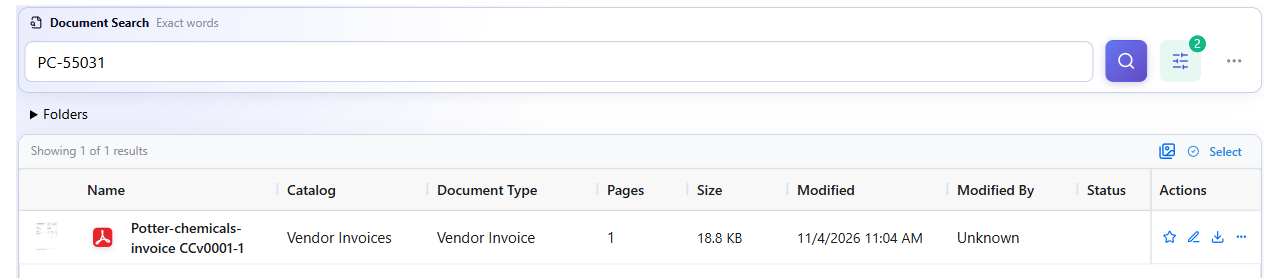
If you get too many results, open the menu (☰) > Search > Search, click Refine search, and choose your invoice catalog and document type.
Things to know
| Situation | What to do |
|---|---|
| Search finds nothing, but you can see the number on the invoice | The scan may have been misread, such as an 8 read as a B. Search for another number or word from the same invoice, and see Scan settings for accurate text reading |
| Two vendors used the same invoice number | You'll get both invoices. Check the vendor name on each |
| You need to sort, report, or export by invoice number | Search can't do that; fields can. Choose how to index vendor invoices compares the ways to fill them in |
Still stuck?
Contact support with the invoice (or its file name), the number you searched for, and the name of the capture job that brought it in.