
Choose how to index vendor invoices when every vendor's layout is different
Four ways to index incoming vendor invoices: search the invoice text, fill fields from your purchasing system by PO number, read your main vendors' layouts with zones, or let CapturePoint 6 do it. Pick the one that fits, then follow its setup guide.
In five minutes you'll know which of four setups fits your invoices, what each one fills in automatically, and where to go next.
Every vendor puts the invoice number somewhere different, and calls it something different: Invoice No., Invoice #, Document No. There are four ways to handle that: three in Content Central, and CapturePoint 6.
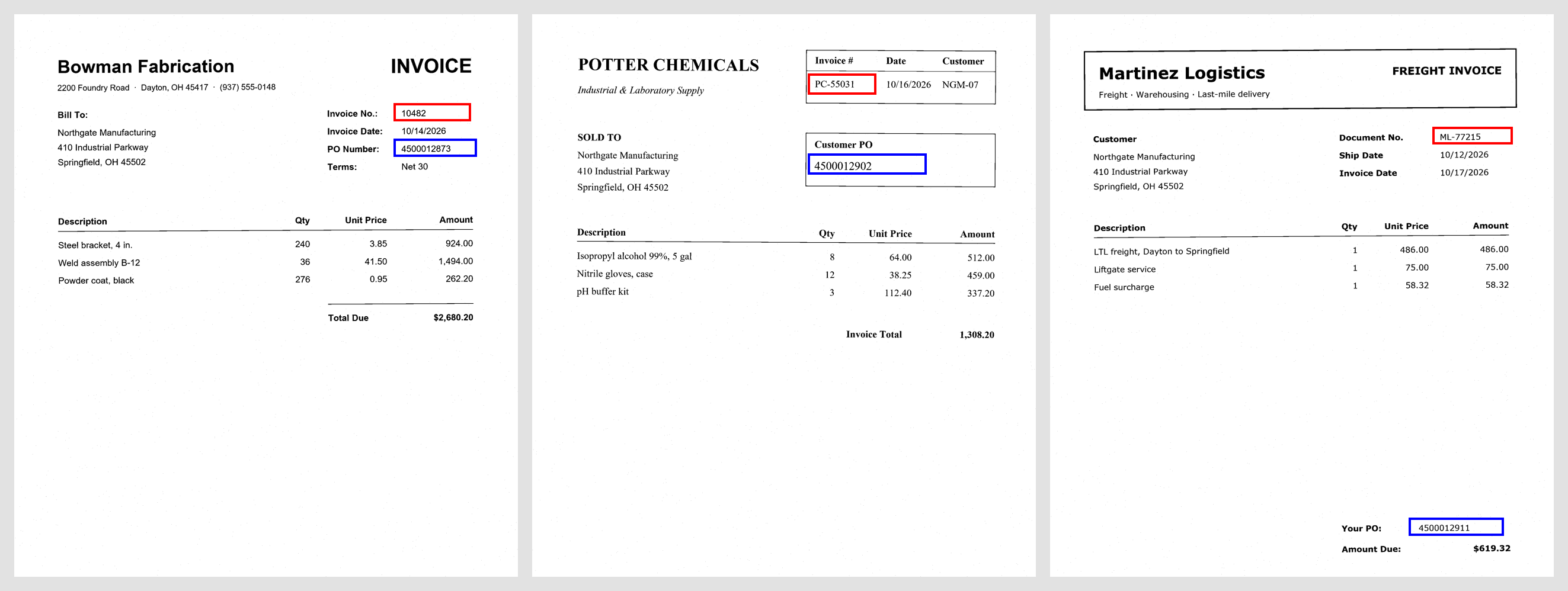
Pick the setup that fits
| Your situation | Use | What happens automatically |
|---|---|---|
| You only need to find an invoice later by a number printed on it | Search only | Every word on the invoice is searchable seconds after it's captured |
| Your invoices show your PO number, and your purchasing or accounting system (or a spreadsheet) knows each PO | PO number and a lookup | Content Central finds the PO anywhere on the first page and fills in the vendor, terms, and other details your system holds for that PO |
| Most invoices come from a handful of vendors whose layouts don't change | Zones for your main vendors (boxes on the page that Content Central reads) | For those vendors, it reads the vendor, invoice number, and PO from each one's own spots on the page |
| Many vendors with no PO to match, layouts that change, or you need totals and line items | CapturePoint 6 | Reads each invoice with no per-vendor setup (see below) |
Do you need fields, or is finding the invoice enough?
Searching finds an invoice by any number on it, and usually needs no setup. Fields go further: you can sort and filter by invoice number, run reports, export values to accounting, and start approvals from them. If people just need to pull up an invoice when a vendor calls, search is enough. If invoice numbers have to feed other work, you need fields.
Mix and match
Search works alongside the other setups, so you can read your top vendors with zones and still find everyone else's invoices by number. The two guides that fill fields also show which field to make required, so an invoice Content Central can't fill waits in the Coding Queue (the list of documents a person finishes by hand) instead of being filed with blanks.
When CapturePoint 6 is the better fit
CapturePoint 6 uses AI to read each invoice and learns from your corrections, then files the invoices into Content Central with their fields filled in. See the overview, the tour, and the free trial on the CapturePoint 6 page.
Good scans matter
The three Content Central setups depend on Content Central reading the printed text, so scan quality makes a big difference. See Scan settings for accurate text reading.
Still unsure?
Contact support with two or three sample invoices from different vendors and a sentence on what you need to do with them (find them, report on them, or export them). We'll suggest the setup that fits.