
Document type permissions, explained
The complete map of who can do what, per document type — every permission, the group/user/creator layers, how grants add up with no deny, and the three extra switches hiding on the same page.
By the end of this page you'll know every permission a document type can grant, the three layers they're granted on (groups, users, the document's creator), and the one rule that explains most permission surprises: grants add up, and there is no deny.
Where they live
Administration > Catalogs & Document Types > pick the catalog and document type > Membership & Permissions.
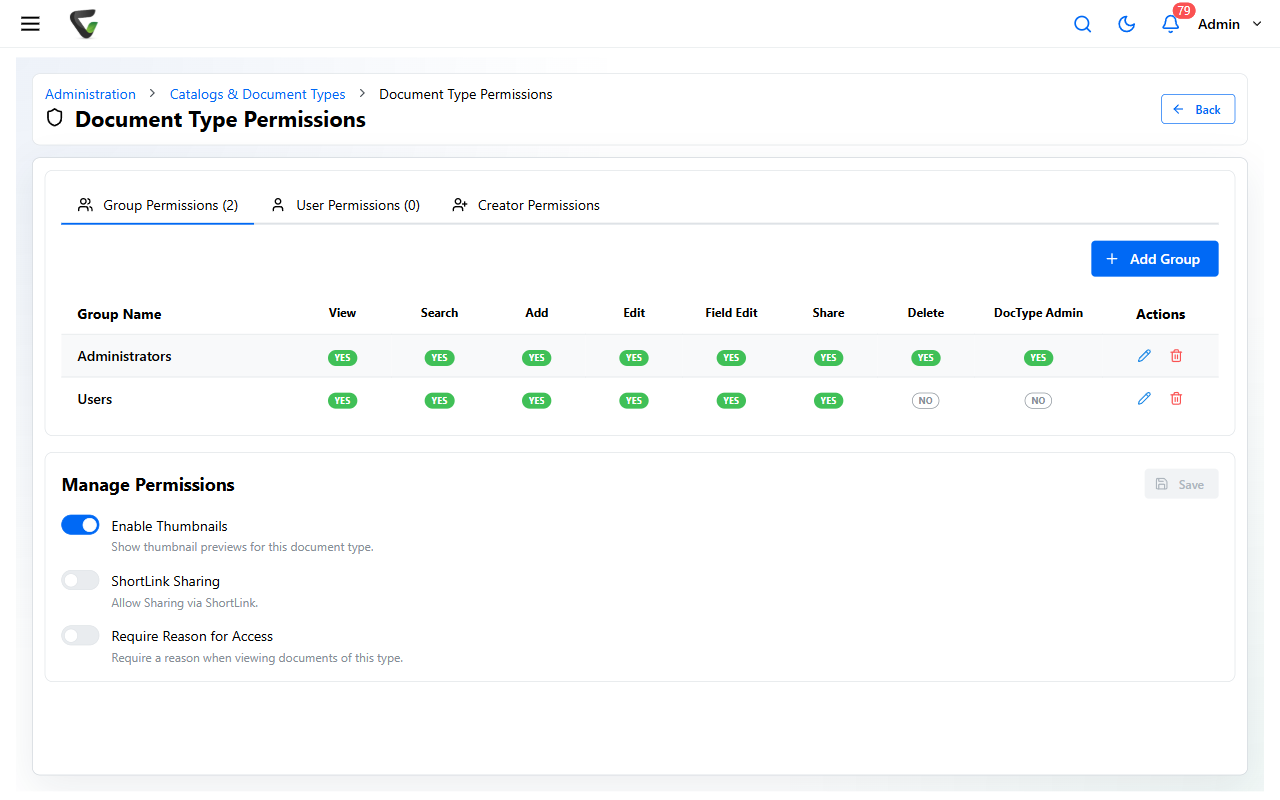
Three tabs:
- Group Permissions — grants for whole groups; the workhorse. Add Group, pick the group, switch on what it gets.
- User Permissions — the same, for individuals; use sparingly (every one-off is something your next access review has to find).
- Creator Permissions — what the person who created a document can do with it, regardless of other grants. This is how "everyone can add, but only see their own" setups work.
The one rule that explains everything
Permissions are additive, across every layer. A user's effective rights = their direct grants + every group they belong to + creator rights on documents they created — all OR'd together. There is no deny: removing someone from one group doesn't take away what another path still grants. When someone "still has access after we removed them," a second path is granting it — check all three tabs.
The permissions
The everyday core, shown as columns in the grid:
| Permission | Grants |
|---|---|
| Allow Document Viewing | Open and read documents |
| Allow Document Searching | Find them in search results |
| Allow Document Adding | Capture/file new documents of this type |
| Allow Document Editing | Change the document content (check-out, revisions) |
| Allow Field Editing | Change field values on filed documents |
| Allow Document Sharing | Share documents outward |
| Allow Document Deleting | Delete documents of this type |
| Can Administer This Document Type | Full control of this type's configuration |
The specialist set, in the edit dialogs:
- Queues: Allow Document Viewing/Editing/Field Editing in Approval Queue — approval work without general edit rights; Allow Approval-Process Assignment / Administration / Review; Allow Work-Queue Assignment / Administration
- Documents: Allow Document Download, Allow Annotation Write, Allow Annotation Print — these appear when your license includes the document viewer component
- Records: Allow Retention Overrides — who may exempt individual documents from retention policies
Each tab's edit dialog offers the full switch list with Enable All / Clear All.
The three switches below the grid
The Manage Permissions panel carries per-type behaviors that aren't per-person:
- Enable Thumbnails — thumbnail previews for this type
- ShortLink Sharing — allow sharing via ShortLink
- Require Reason for Access — viewers must state a reason before opening a document of this type, and the reason lands in the document's history (a favorite for HR and compliance-sensitive types)
Reading a permission problem
"They can't see it" — check Viewing and Searching; and remember search only returns types where searching is granted.
"They can see it but can't fix a typo in the fields" — that's Allow Field Editing, distinct from Document Editing.
"They still have access after removal" — the additive rule: check the other tabs and their other groups.
"The permission I need isn't in the grid" — the grid shows the core set; open the row's pencil for the full list.