
Show approval status as a document field
Give an approval process a system field — Approved, In Progress, Rejected at a glance in grids and results — including the enable-it-twice step everyone misses and an honest note on where the field can't be used.
Before you begin
- An approval process on the document type
At the end of this guide, every result grid can carry a column that answers the constant question — Approved? In Progress? Rejected? — per document, per process, without opening anything.
The field's possible values, per document: Approved, In Progress, Rejected, Removed, or Never Approved (the document's type is on the process, but this document never entered it).
Step 1 — Enable it on the process
In the approval process editor (Administration > Catalogs & Document Types > the type > Approval Processes > open the process), under Options, tick Enable system field and give it a Name: — the name becomes the column header, so PO Approval Status beats Status the moment a second process exists.
Step 2 — Enable it again, for people (the missed step)
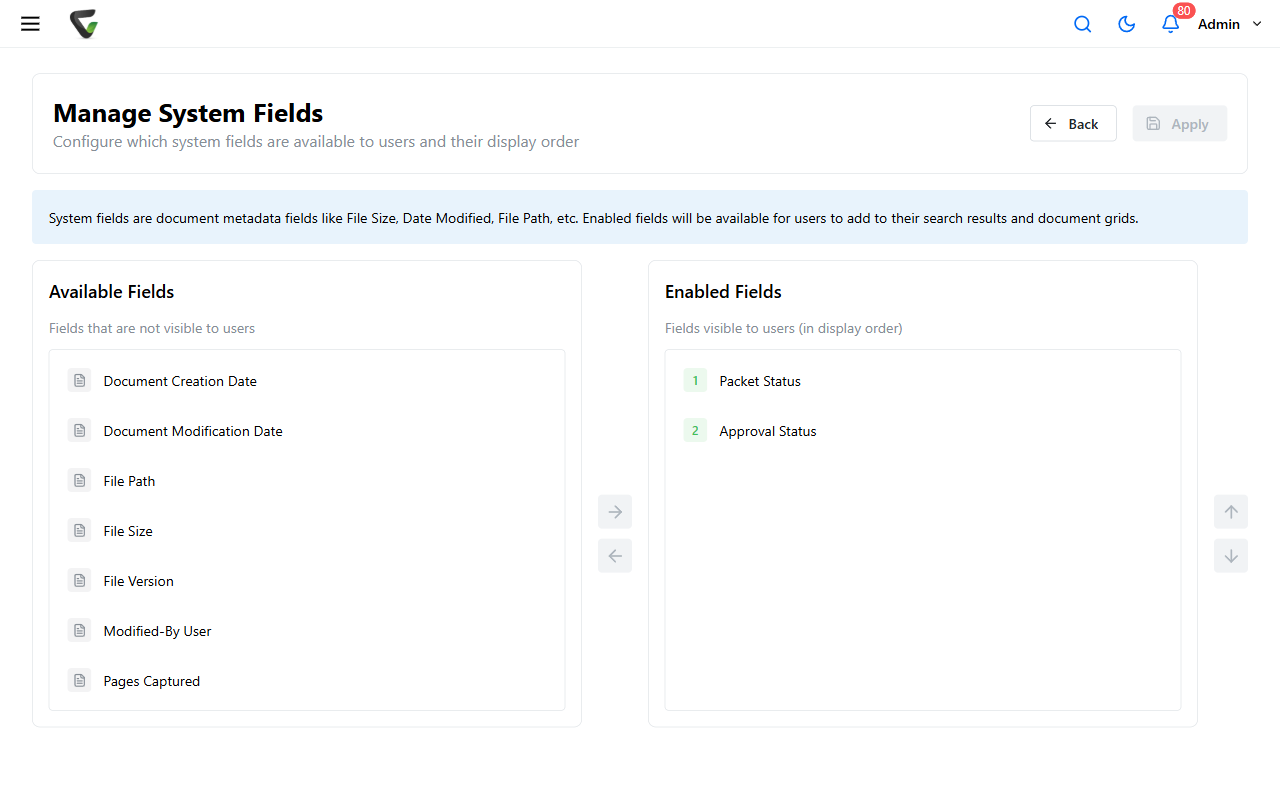
A new system field starts hidden from users. Administration > Manage System Fields ("Configure which system fields are available to users and their display order"): move your field from Available Fields to Enabled Fields, position it with Move up / Move down, and Apply.
Skip this and step 1 appears to have done nothing — the single most common outcome of this feature, now avoided.
Step 3 — Put it in front of eyes
Each user adds the column where they want it — Options > the Grid Fields / Results Fields tabs — like any other field. Two scoping facts:
- The field is offered only to users who are members of the process's document type — others never see it listed, which is correct, not broken.
- One field per process: three approval processes that all need status columns means step 1 three times, with three distinguishable names.
Where it works — and where it honestly doesn't
Works: as a column in results and grids — the at-a-glance use it exists for — and in report templates, where the Documents by Approval Process report type slices by exactly this status for the monthly numbers.
Doesn't: as a search criterion in the current interface — you can't filter a search by the status field itself. For "show me everything In Progress," the practical answers are sorting the column in a grid, the report above, or the Approval Queue views, which are that filter in permanent form.
Success check: run a document into the process and watch the column: In Progress on entry, Approved after the vote — and a document of the same type that never entered reads Never Approved, which is the value that confuses people until they've read this sentence.