
Read a document's history and revisions
The Version History window decoded — what major and minor version numbers mean, which rows hold downloadable files, how to bring an old version's content back, and how to read the action names.
By the end of this page you can open any document's Version History, tell which rows carry an actual file, download a prior version, and answer the questions history exists for: who did what to this document, and when.
Opening it
Choose View History from the document's actions menu — on search results, in the Folder Browser, or in the viewer. The Version History window opens with one row per event, newest first, and a count badge in the title.
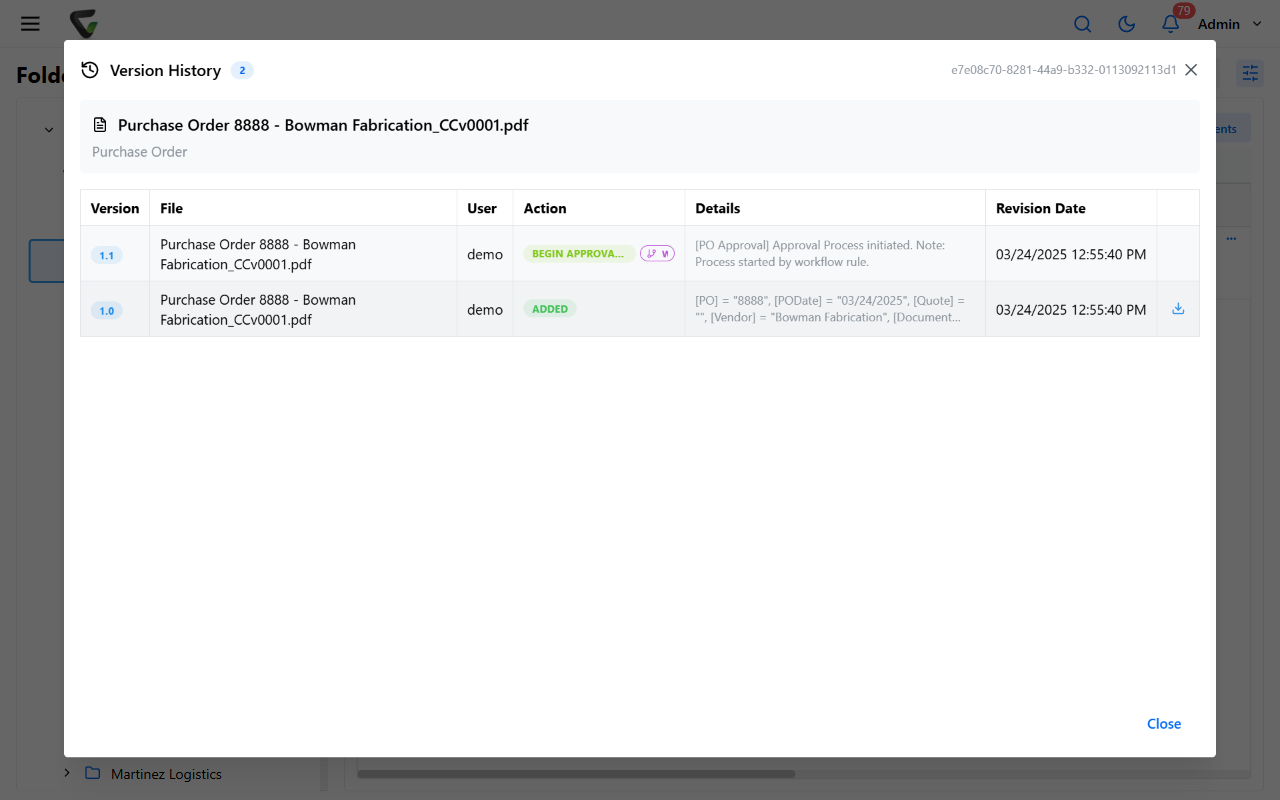
Reading the version numbers
Every document starts at 1.0, and the two halves of the number move for different reasons:
- The major number (1.0 → 2.0) increments when the file changes: the original Added, then Checked In, Uploaded Revision, Replaced, or Appended.
- The minor number (2.0 → 2.1) increments for everything that happens around the file: Checked Out, Check-Out Undo, Properties Updated, Moved, retention-policy changes.
So the rule of thumb: whole numbers are files, decimals are events. A document at 3.4 has had three file versions and, since the third, four recorded events.
What the rows mean
The Action column speaks in past tense. The ones people ask about:
| Action | What happened |
|---|---|
| Added | The document entered the system — version 1.0 |
| Checked Out / Checked In | An editing session started / ended (check-in brought a new file) |
| Check-Out Undo | A check-out was released without changes |
| Uploaded Revision / Replaced / Appended | The file was changed directly |
| Properties Updated | Field values changed |
| Moved | The document changed folders |
| Make Searchable | Text recognition was run on it |
Approval and work-queue events (Begin Approval Process, Approved, Work-Queue Assignment, and kin) record routing rather than content. A row with a small WF badge was generated by workflow, not a person.
Downloading a prior version
Rows that carry a file show a Download control at the right — that's every major version, provided your permissions allow downloading. Minor-version rows are events, not files; there's nothing to download from them by design.
Bringing an old version back
There is no one-click restore — deliberately, since "restore" would quietly discard whatever came after. The supported path is explicit and leaves its own trail:
Download the version you want from its history row.
Use Upload Revision to make it the new current version.
The result is a new major version whose row says exactly what happened — the old content is current again, and history still shows everything in between.
Two places history won't answer
- Who's looking at documents is the Event Viewer's job (behind your avatar menu), not Version History — history records changes and routing.
- Deleted documents have no history to open. Delete documents — and what happens next covers what deletion actually does.